Results 1 to 10 of 10

Thread: Editting help needed

  1. #1
    Senior Member JDANDO's Avatar
    Join Date
    Oct 2009
    Location
    KMSP, KANE
    Posts
    863

    Editting help needed

    Once again I am throwing myself at the feet of the NYCA collective genius. But first a story........

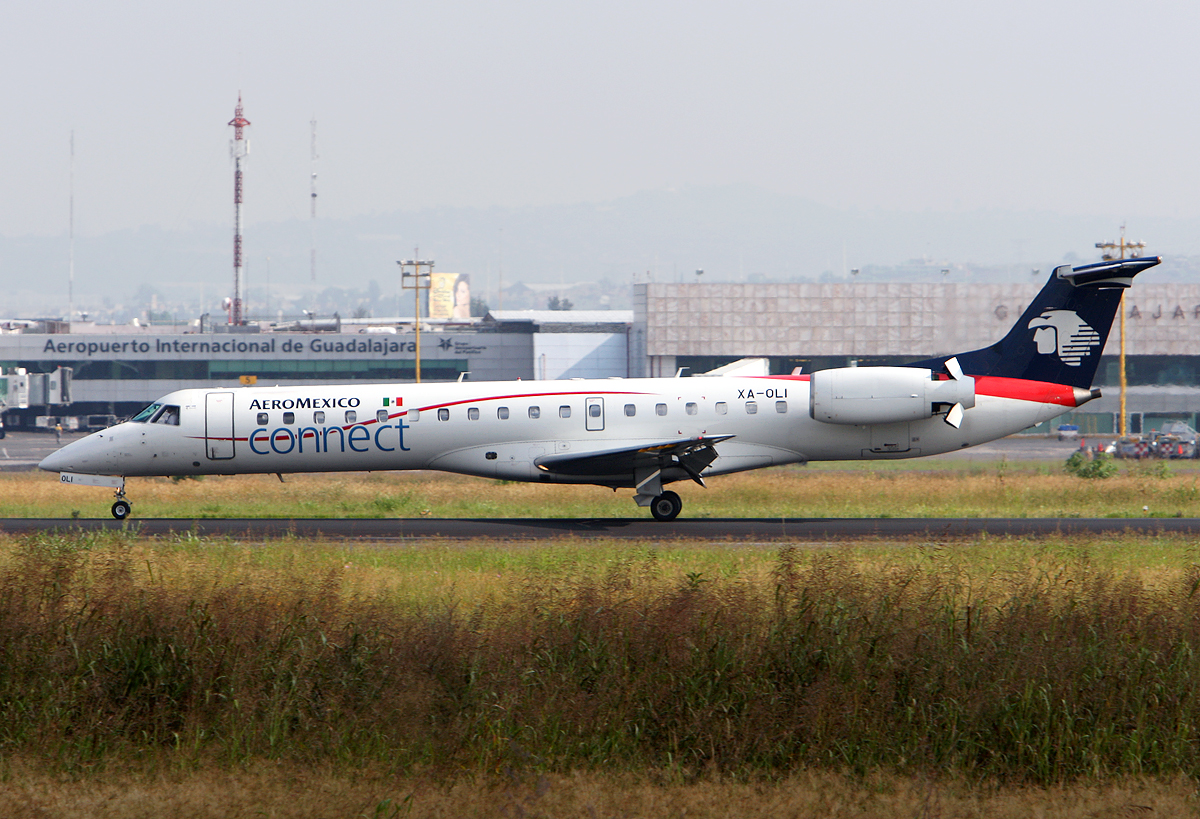
    I visited Guadalajara, MX a year and a half ago to visit family. I had a free morning so I went off to the airport to see what I could see. After a "conversation" with one of the locals I went down a road with pot-holes the size of Volkswagons and everyone that was walking was carrying a machete. Not to be discouraged I continued on and pulled into the walled complex that had a 1 story building overlooking the main runway. After a "conversation" with the owner he said sure, I could stand on the flat roof and take pictures. So I ended up in the spotting location of a life time but with typical Guadalajara conditions; hazy, smog, fog, smoke, etc. I shot for a couple hours and left biding farewell to my new friends.

    Time passes.

    Upon my return to the States I was troubled to find that the 70-200 +1.4x TC that I shot was miss-focusing rather badly. I have since dialed in +10 on the micro-adjust.


    Time passes. I join NYCA meet great people, get some tips. My post-processing skills progress, but before I tackle these alone I thought I would ask for guidance regarding, high-pass filters, haze reduction and ?

    The question is; Can any of these be saved? I shot jpeg and fullsize images are here;

    http://jeremyd.smugmug.com/Airplanes...99077189_vASKd

    Here are a couple sample pictures.

    A colorful MX airline


    MX's newest airline


    One of the locals keeping me company


    Ramp
    Jeremy in Minnesota

    My pictures on jp.net

  2. #2
    Senior Member
    Join Date
    Jun 2009
    Location
    KCLT
    Posts
    552
    I'm no expert editor, and I'm sure if Manny or one of the Mark's came here, they could do better job, but here are my shots at 2 of them. If you like them, I'll do more:


    Adam Sheinhaus

  3. #3
    Senior Member JDANDO's Avatar
    Join Date
    Oct 2009
    Location
    KMSP, KANE
    Posts
    863
    Thanks Adam. What was the workflow, if I can ask? The goal is to get at least one up on JP.net.
    Jeremy in Minnesota

    My pictures on jp.net

  4. #4
    Senior Member gonzalu's Avatar
    Join Date
    May 2009
    Location
    The Bronx, New York
    Posts
    6,028
    Adam, no need for me, you've got it down pat!!! GREAT work :-)

    I am sorry I can't come up with anything better than Adam has already done ... here are the same two in my workflow

    STRAIGHTEN
    CROP/CENTER
    RESIZE
    COLOR BALANCE
    CURVES
    SAVE AS JPG FINE

    right-click and view or save as... for the full 1024 px image


    Last edited by gonzalu; 2011-02-27 at 12:25 AM.
    Manny Gonzalez
    Thrust Images | General Photography | R.I.P. Matt Molnar 1979-2013
    BRING BACK THE KJFK/KLGA OBSERVATION DECKS

  5. #5
    Senior Member
    Join Date
    Jun 2009
    Location
    KCLT
    Posts
    552
    Quote Originally Posted by JDANDO View Post
    Thanks Adam. What was the workflow, if I can ask? The goal is to get at least one up on JP.net.
    1) Straighten (Along the building in the background)
    2) Crop
    2) Levels
    3) Color Balance (I added a little saturation)
    4) 2 Passes through the Unsharp Mask--180 and then 20 if not a little more.
    5) Resize
    6) Save as .JPEG
    I'll do some more as soon as I get home this afternoon (Around 3).

    Manny, thank you!! I appreciate it!
    Adam Sheinhaus

  6. #6
    Senior Member JDANDO's Avatar
    Join Date
    Oct 2009
    Location
    KMSP, KANE
    Posts
    863
    Thanks guys. I will give it a go. These ones are from the end of the session and after looking at them again they do not look too bad. Thanks for the assistance and keep you fingers crossed for some JP.net love!
    Jeremy in Minnesota

    My pictures on jp.net

  7. #7
    Senior Member
    Join Date
    Jun 2009
    Location
    KCLT
    Posts
    552
    Here's ABX if you want it:

    You can do what you want with these edits: upload them, share them, use them on your SmugMug...
    Adam Sheinhaus

  8. #8
    Senior Member gonzalu's Avatar
    Join Date
    May 2009
    Location
    The Bronx, New York
    Posts
    6,028
    Manny Gonzalez
    Thrust Images | General Photography | R.I.P. Matt Molnar 1979-2013
    BRING BACK THE KJFK/KLGA OBSERVATION DECKS

  9. #9
    Senior Member MarkLawrence's Avatar
    Join Date
    Apr 2005
    Location
    1 Miles NNW of NOVAE - KFLL - Davie, FL
    Posts
    3,944
    Here's a shot at the E145 - as above - do what you'd like....

    Mark Lawrence - KFLL
    Davie, FL

    Community Manager NYCAviation.com
    email: [email protected]

    http://www.jetphotos.net/showphotos.php?userid=1538
    https://www.flickr.com/photos/9633283@N04/

  10. #10
    Senior Member gonzalu's Avatar
    Join Date
    May 2009
    Location
    The Bronx, New York
    Posts
    6,028
    Jeremy a bit of advice on the exposure and metering. All the images seem to be slightly to heavily underexposed which is a death knell for a digital image. Your meter is getting fooled since the scene is split in half with a dark foreground and a super hazy bright upper half background. I would just manually meter using spot on a white fuselage and overexpose by +1 to +1 1/3 or whatever it needs as per confirmation through histogram. Otherwise a TIGHT counter-weighted circle (if your camera offers it) or a large SPOT meter circle... both with + compensation since they will render whites as grey. That will likely give you the most reliable exposures. MATRIX (Nikon) or EVALUATIVE (Canon) are terrific but can be fooled in the right conditions... bright light will just kill them.
    Manny Gonzalez
    Thrust Images | General Photography | R.I.P. Matt Molnar 1979-2013
    BRING BACK THE KJFK/KLGA OBSERVATION DECKS

Bookmarks

Posting Permissions

  • You may not post new threads
  • You may not post replies
  • You may not post attachments
  • You may not edit your posts
  •